For CRMs and platforms
Visual production inside your product, without building it
One API for enhancement, decluttering, staging and social formats. Your users never leave your interface, and you never hire an imaging team.
- 01
A native feature, not a redirect
Editing happens in your UI, under your brand, on your domain.
- 02
Weeks, not quarters
One documented REST API. No models to train, no imaging team to build.
- 03
A new line on the invoice you already send
A fixed price per image you mark up, billed through your existing subscription.
We run these models in our own product. The studio serves hundreds of client accounts every month.
Four calls, and it's in your product
- 01
Authenticate
One API key per environment. Sandbox first, no commitment.
- 02
Post the visuals
Send images from wherever your users upload them today.
- 03
Pick the workflow
Enhancement, decluttering, staging, social formats. Per call or per account default.
- 04
Get files back
Publish-ready output to your storage, under your account's own profile.
Case study
How we put these models into our own software
We built the studio interface on the same API this page describes. We were the first platform to integrate these models, we hit the problems you are about to, and this is the result.
- 100k+
- properties shot
- 3,000+
- properties a month
- 18
- countries
The constraint
Platforms want to offer visual editing to their users. Getting there today means assembling it: one vendor for enhancement, another for staging, a third for object removal, each with its own API, its own pricing model and its own idea of what good looks like. The result is a feature that costs more than it should, behaves inconsistently across tools, and produces output your users can tell was generated.
Quality is the harder half. Generic image models were not trained on property interiors, so they get windows, verticals and empty rooms wrong in ways a buyer notices. Ours were trained on eight years of real listing production, millions of data points and before-and-after pairs from shoots we ran ourselves, which is why the output holds up on a listing rather than only in a demo.
Cost is the other half. Token and credit models make your margin move every time a user edits something twice, and nobody can price a feature they cannot forecast. A fixed price per image means you can put a number in your own pricing page and keep it.
What we built
The studio interface, running on the same API this page describes.
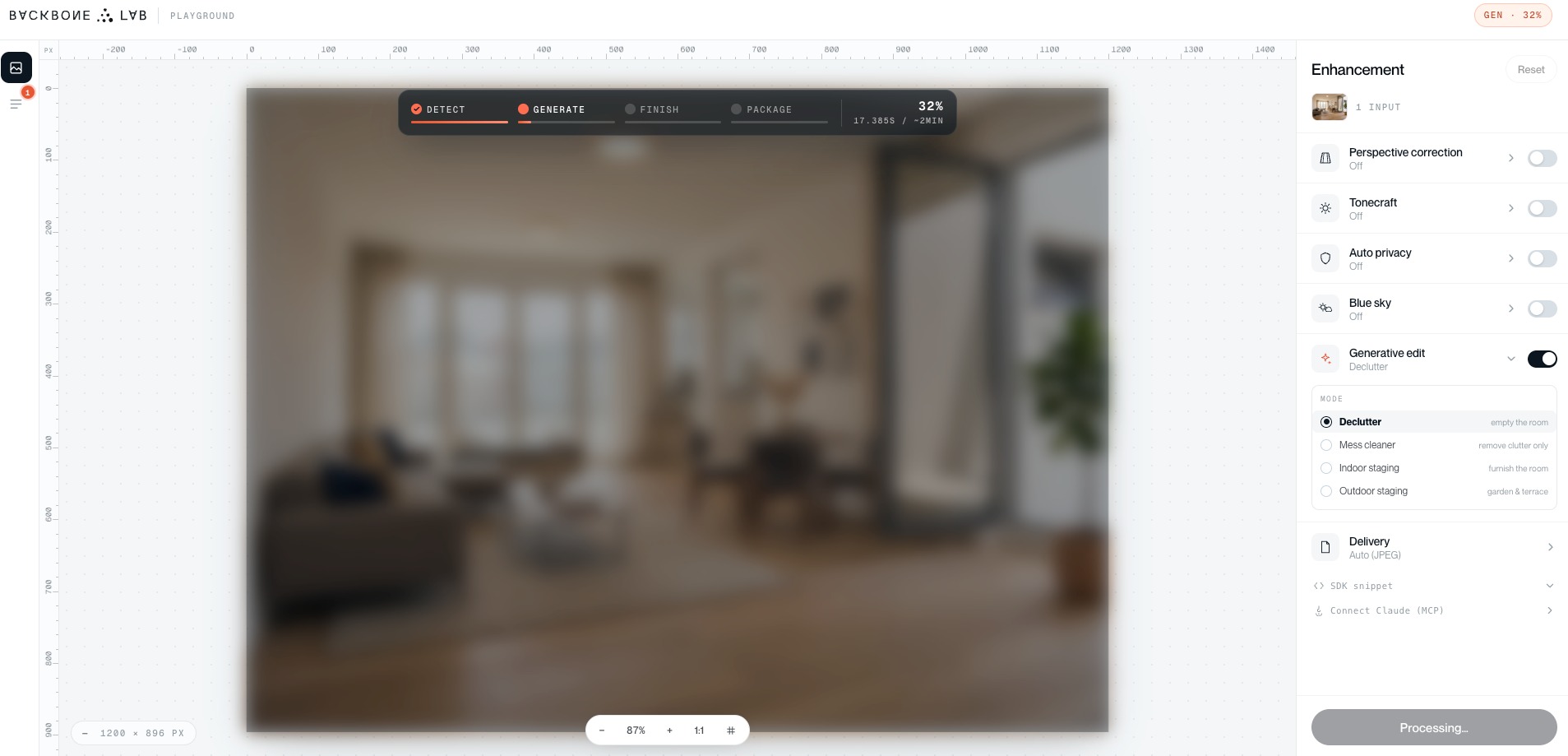
- One panel, every model.
- Enhancement runs down the right rail: perspective correction, Tonecraft, Auto privacy, Blue sky. Below it, Generative edit opens into four modes on the same call - Declutter to empty a room, Mess cleaner to remove clutter only, Indoor staging to furnish, Outdoor staging for garden and terrace. Delivery packages the output in the format the user publishes to, social formats included. Everything in one surface instead of four tools, and the full list of models and parameters is in the API documentation.
- Automatic where it can be, manual where it matters.
- Enhancement runs without being asked. Generative edit is user-initiated, because only the person selling the property knows what should go and what should stay.
- The pipeline is visible.
- Detect, generate, finish, package, with elapsed time and progress shown as it runs. Users tolerate a wait they can see; they abandon a spinner they can't.
- Built for embedding, not just for us.
- The same panel exposes an SDK snippet and an MCP connection, because we built it as a reference implementation of the API rather than as a closed product.
- Compliance built in, not bolted on.
- Auto privacy handles faces and plates, and AI-generated visuals carry the transparency label the EU AI Act requires. We had to build that anyway. You don't.
What we learned
- Every client has their own idea of what good looks like.
- One house style is too dark for one agency and too flat for the next. Features have to flex to each client’s taste, configured per account, or you spend your time arbitrating between them.
- Per-account defaults matter more than per-image controls.
- Users configure once and then stop thinking about it. Sliders on every image go unused.
- Show the before.
- Every edit needs a visible original to compare against, or users don't trust the output enough to publish it.
Questions we get from platform teams
Yours. The output carries no Backbone branding and the editing surface is configured to your tokens, so your users see one product.
One engineer against a documented REST API, days for enhancement on a single flow. You can run it in sandbox before committing to anything.
Blur and redact run automatically, and AI-generated visuals come back carrying the transparency label the AI Act requires. The documentation comes with it.
A fixed price per image. No tokens, no credits, no usage tiers, so you know your cost per listing before you sell it.
Try it against your own product
Get sandbox access and run your users' real visuals through the workflows before you commit to anything. One call to set it up.
Book a demo